

Concepts
Understand the core concepts of the Prisma Console: user accounts, workspaces, projects, and resources
The Console workflows are based on four main concepts:
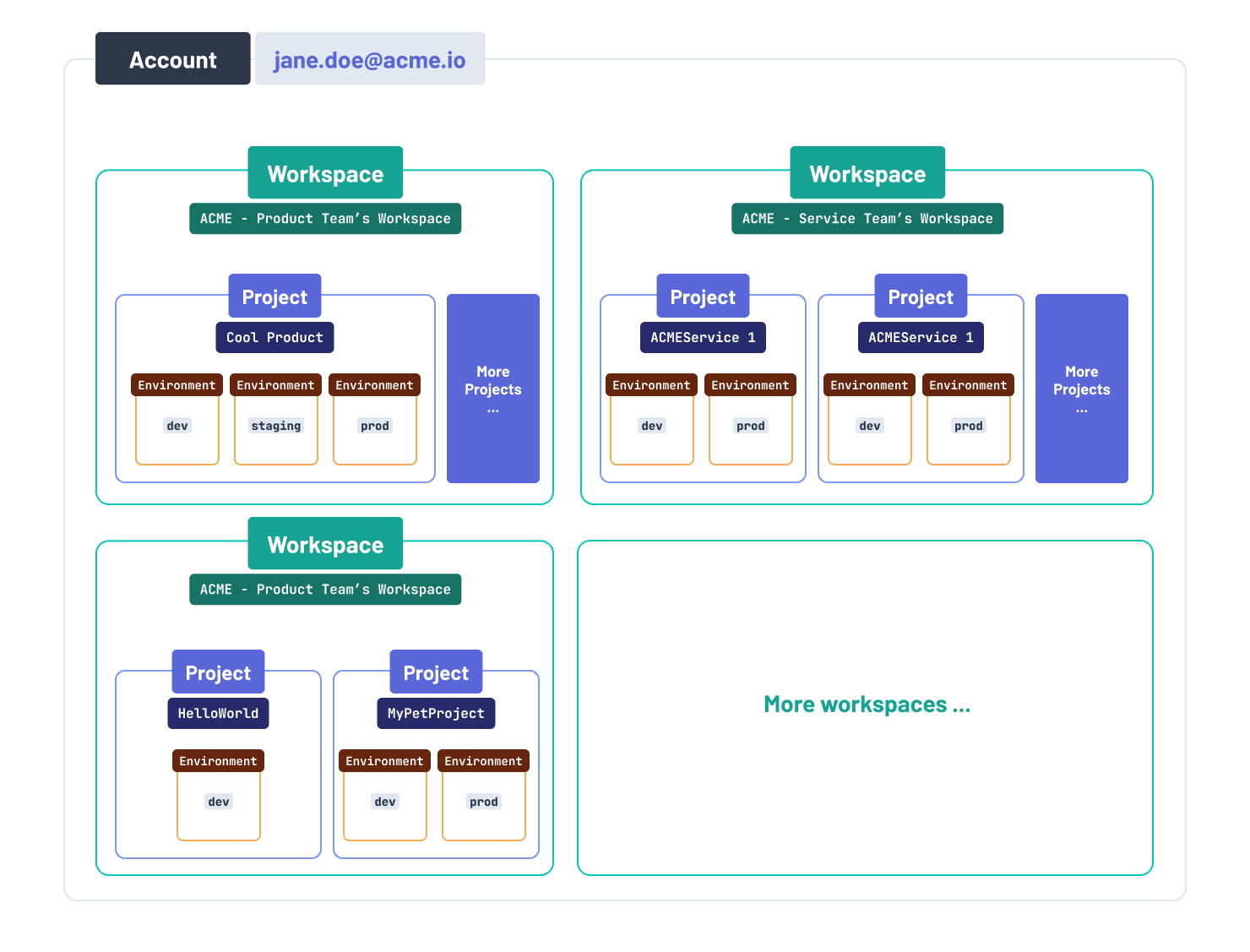
- User account: In order to use Prisma products, you need to have a Console user account. A user will typically create one user account to manage all their workspaces, projects and resources. The user can also be invited to join other workspaces to collaborate on the projects in that workspace.
- Workspaces: A user account can belong to multiple workspaces. A workspace typically represents a team of individuals working together on one or more projects. Billing is on a workspace level, i.e. the invoice for a workspace at the end of the month captures all costs associated with the projects in that workspace.
- Projects: A project belongs to a workspace. It typically represents the application or service a team is working on.
- Resources: Resources represent the actual services or databases within a project. For example, in Prisma Postgres, each project can contain multiple databases. For Accelerate, resources might correspond to different environments (like
Development,Staging, orProduction). Connection strings are provisioned at the resource level, and products are configured per resource as well (e.g., the database connection string used for Accelerate).
Here is a visual illustration of how these concepts relate to each other:
User account
A user account is the prerequisite for any interactions with Prisma products. You can use it to manage your workspaces (and their projects). A user account can be invited to collaborate on workspaces created by other users as well.
If you need to delete your user account, go here.
Workspace
You can create several workspaces. A workspace is an isolated space to host projects. A workspace can have multiple user accounts associated with it so that multiple users can collaborate on the projects in the workspace.
In each workspace, you can:
- view and manage all projects (and their resources) in that workspace.
- manage billing, i.e. select a subscription plan, configure payment methods, or view the invoice history.
- view the usage of your enabled Prisma products across all projects in that workspace.
- invite other users to collaborate in the workspace.
- access the Optimize dashboard to measure query performance and receive AI-powered recommendations.
Project
In each workspace, you can create several projects. A project typically represents an application (a product or service). You typically have one Prisma schema per project.
In each project, you can:
- view and manage all resources (like databases) in that project.
The number of projects you can create in a workspace depends on the subscription plan configured in that workspace.
Resources
Resources represent the actual services or databases within a project. The type of resources available depends on the Prisma products you're using:
- For Prisma Postgres: Each project can contain multiple databases. These databases are the primary resources you'll manage.
- For Accelerate: Resources typically correspond to different deployment stages (like
Development,Staging, orProduction).
In each project, you can:
- Create and manage multiple resources (databases or environments)
- Generate connection strings specific to each resource
- Configure product-specific settings:
- For Prisma Postgres databases:
- View database metrics and performance
- Configure connection settings
- Manage database users and permissions
- For Accelerate resources:
- Set your database connection string
- Configure the region for connection pooling
- Adjust connection pool size and performance settings
- Set query duration and response size limits
- Enable static IP for secure connections
- For Prisma Postgres databases:
The number of resources you can create in a project depends on your subscription plan.